
We made our own IR Capture app
We have used several IR Capture apps over the years and while many were good, none of them worked the way we wanted in terms of workflow and simplicity of use. This slows down the whole process of creating IRs and helps to introduce mistakes into the process.
So why is Surefyre IR Capture different?
Well for a start it’s cheap. Yes we know there’s free options, we’ve tried them and still ended up building our own.
Actually it’s free unless you want the advanced version with longer tails and file-name generation and other features to ease your workflow, and even then yes, it’s still cheap.
Check out the features…

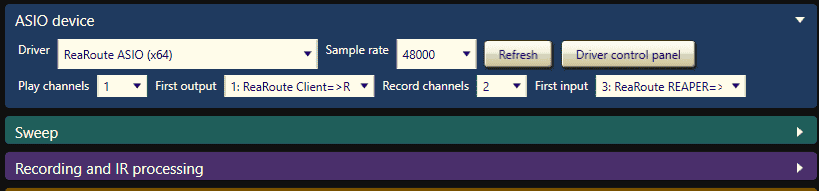
ASIO i/o – 16* simultaneous channels of i/o means you can easily capture multi-out devices and send stereo IR signals or wider, too.
* The free version is restricted to 1 playback and 2 record channels

Controllable sweep generation lets you choose the length, frequency range and output level of the sweep

Flexible and smart capture features* allow you to end capturing after the signal drops below a threshold you set and/or after an amount of time you choose, up to 120 seconds. Initial silence trim, normalisation and end fadeout help to give you a tidy and predictable result
* The free version is restricted to a 5 second tail
The above three panels are collapsible to allow you to enter your settings and then concentrate on your captures.
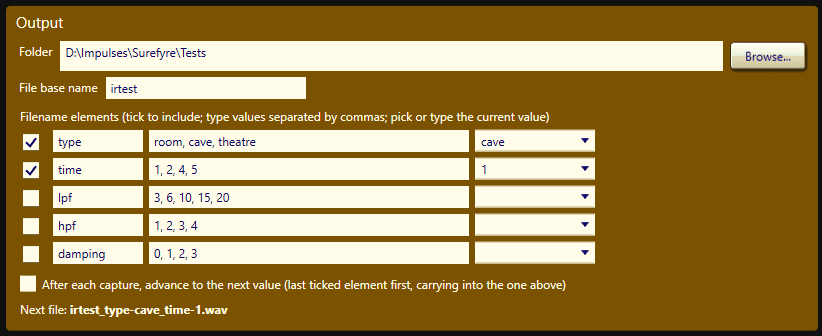
Smart filename generation* allows you to set your output directory and filename plus the setting variations you are using, so in the above example as you changed the hardware settings your output files would be sequentially named <basename>_type-room_time-1.wav and then <basename>_type-room_time-2.wav progessing to <basename>_type-cave_time-1.wav after room/5 had been captured. This allows you to set up your parameters beforehand and then simply step through the captures. The drop-downs on the right allow you to ‘go back’ to a previous capture setting. The checkboxes select how many of the five parameter variations you want to use and whether you want to use the smart file-naming.

Clear at-a-glance level monitoring helps you to keep your i/o levels where they should be. The Sweep Test button let’s you preview your settings before starting captures. The Stop Recording button does what it says.

The status window at the bottom provides license check information at startup and test/capture summary information.
Download your copy now!
Surefyre IR Capture is only available for Windows currently.
Get smart file-naming, longer tails and more with a lifetime license!
£15